Table of Contents
Microservices + UI: CI/CD Pipeline Architecture
GitHub + GitLab + Docker + Nginx Blue-Green Deployment
1. Overview
This document describes the CI/CD architecture for a microservices platform where:
- Source code is hosted in GitHub
- GitLab CI/CD builds and deploys containers
- Docker images are stored in GitLab Registry
- Docker Compose deploys services
- Blue-Green deployment using Nginx ensures zero downtime
- Dynamic pipelines build only changed microservices
- GitLab keeps only the latest 5 container images
This approach is commonly used to reduce pipeline time and infrastructure cost.
*Note
The services name used in this document are dummy service names. Since the document is generic and similar approach can be adapted for other CICD deployments irrespective of inclusion/exclusion of Microservices from the application architecture.
2. High Level Architecture
| System | Purpose |
|---|---|
| GitHub | Source code repository |
| GitLab CI | Build & deployment pipelines |
| Docker | Containerization |
| GitLab Registry | Docker image storage |
| Docker Compose | Service orchestration |
| Nginx | Traffic routing |
| Linux Servers | Runtime environments |
3. CI/CD Pipeline Flow
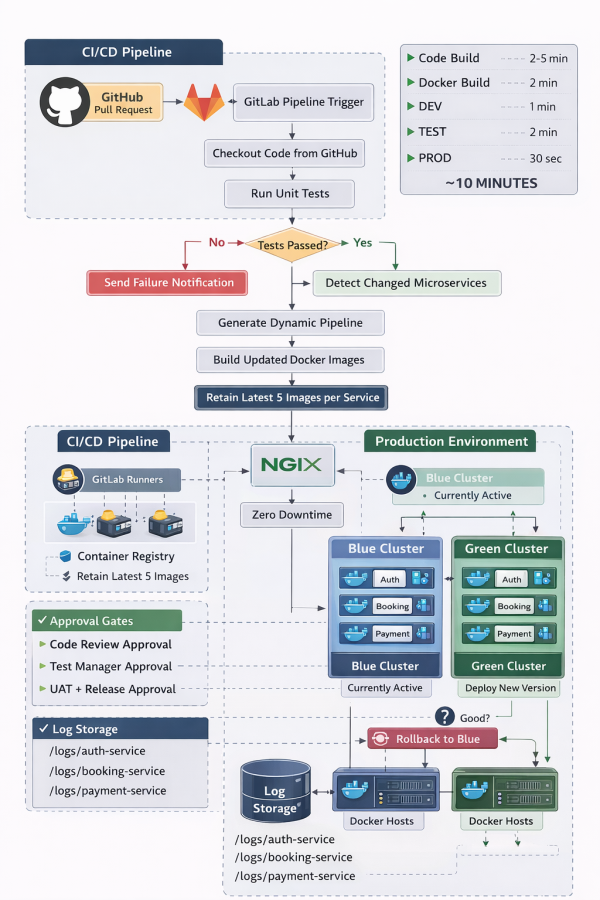
4. Deployment Approval Workflow
The pipeline includes manual approval gates to ensure controlled deployments.
| Environment | Approval Required | Description |
|---|---|---|
| DEV | Code Review | Code merged after peer review |
| TEST | Test Manager | QA validation before testing |
| PROD | UAT + Release Manager | Business validation before production |
5. Dynamic Microservice Pipeline
Large systems may contain 20–100 microservices.
Instead of rebuilding everything, the pipeline:
- Detects changed services
- Generates jobs dynamically
- Builds only those services
Example
If only:
auth-service
booking-service
changed, then pipeline creates jobs:
build-auth-service
deploy-auth-service

build-booking-service
deploy-booking-service
Other services are skipped.
This reduces pipeline time drastically.
6. Docker Image Lifecycle
Each microservice is containerized and pushed to:
GitLab Container Registry
Image Retention Policy
To reduce storage cost:
Keep latest 5 images Delete older images automatically
Example:
auth-service
├── v1
├── v2
├── v3
├── v4
└── v5
Older images are removed automatically.
7. Blue-Green Production Deployment
Production environment contains two identical environments.
| Environment | Role |
|---|---|
| Blue | Currently active |
| Green | New deployment |
Deployment Process
- Blue is currently serving traffic
- New version deploys to Green
- Health checks run
- Nginx switches traffic
- Blue becomes standby
8. Nginx Traffic Switching
Nginx acts as the traffic router.
Example Nginx upstream
upstream backend {
  server green:8080;
}
Switching traffic:
nginx -s reload
Result:
Zero downtime release
9. Health Check & Rollback
After deployment:
/health /ready /status
are validated.
If healthy
Switch traffic to Green
If unhealthy
Rollback to Blue
Users never experience downtime.
10. Selective Service Restart
Instead of restarting the entire stack:
docker compose up -d auth-service
Only updated services restart.
Benefits:
- Faster deployment
- Less service disruption
- Lower resource usage
11. Logging Strategy
Each service maintains separate log directories.
Example:
logs/
  auth-service/
    auth-service-v1.log
    auth-service-v2.log
  booking-service/
    booking-service-v3.log
Benefits:
- Easy debugging
- Service isolation
- Faster incident resolution
12. Repository Directory Structure
Adapted project structure:
platform-root/

services/
│
├── auth-service/
│
├── src
│
├── Dockerfile
│
└── service.yml
│
├── booking-service/
│
├── src
│
├── Dockerfile
│
└── service.yml
│
└── payment-service/

docker/
  docker-compose.dev.yml
  docker-compose.test.yml
  docker-compose.blue.yml
  docker-compose.green.yml

nginx/
  nginx.conf
  upstream.conf

logs/
  auth-service/
  booking-service/
  payment-service/

scripts/
  detect-changed-services.sh
  generate-dynamic-pipeline.sh
  deploy-service.sh
  nginx-switch.sh
  cleanup-old-images.sh

.gitlab-ci.yml
README.md
13. Benefits of This Architecture
Faster Pipelines
Only changed services build.
Lower Infrastructure Cost
Old images automatically removed.
Zero Downtime Deployments
Blue-Green strategy with Nginx.
Production Safety
Approval gates prevent accidental releases.
Better Observability
Per-service logging.
Enterprise Scalability
Supports 50+ microservices easily.
14. Typical Deployment Timeline
| Stage | Time |
|---|---|
| Code build | 2–5 min |
| Docker image build | 2 min |
| DEV deployment | 1 min |
| TEST deployment | 2 min |
| Production blue-green | 30 sec |
Typical full release:
~10 minutes